Linked In Profile Basics

Thought about doing my single next post as ways to personalize LinkedIn, then laughed at myself and thought, “Really??  Sum up ‘Personalizing LinkedIn’ in one post?!?”  So this will be broke up into at least two posts, we’ll see how it goes!  As I’m going along I may decide to focus on more areas and add more posts, we’ll see what happens.

I wanted to start with Profile basics, perhaps a “LinkedIn 101”.  There are some really great ways to add onto your profile with different applications, links to different Social Media (Twitter or Facebook for example) or to your blog, have a portfolio, show books that you’re reading – the list goes on.  So we’ll touch on those types of things in additional posts.

What I want to share with you is different steps that you can take to get your profile completion level as close to 100% as possible.  Let’s start at the top and work our way down.  I’ll skip over stuff that is pretty basic or needs little discussion.  Let’s start with Name.  You do have the option of showing your full name or first name and last initial – I would highly recommend using your full name.  This will allow you to be found so much easier, both in searches on LinkedIn and actually Google as well.

You can also personalize your job/personal description.  Most people leave it at the default, partially because they don’t know you can change it – but you can!  Default is whatever job position you have labelled as current, but that doesn’t always describe you enough, and this is a great place to work in those infamous keywords.  If I left mine alone it would have said “President at ARK Squared Productions”, but that doesn’t really say what I do.  Instead I’ve changed it to say “Web & Graphic Design Professional”.  This REALLY tells people what I do – and again, let’s people find be better in searches.

For positions, the easiest way to populate this is to refer to your resume, that most people have anyway!  I have only listed my most recent and relevant positions, people are not really going to care that I worked as a cashier in high-school.  Make sure when you enter in the company name that you select an existing company where possible.  If you just add it you’re not actually linking to it, by selecting the actual company you connect yourself to it in LinkedIn and have more potential of being found that way, and can boost your name in searches in LinkedIn.  Of course if you’re the business owner you’ll likely have to add it in, but I would recommend adding you company to LinkedIn as well – an easy way to get more info out about your company!  The education section works much the same way as positions, again, make sure to try and select your institution instead of just entering it yourself!

Your summary is also an important step.  Much like I mentioned in my last post about Twitter, if you don’t have a good description about who you are then people may decide to not follow you!  If you want to connect with people let them know who you are.  And it’s a great way to highlight all the important stuff that you want people to focus on from your profile in case they don’t scroll down to read more.

Recommendations are another important step to getting closer to your completion percentage, and doesn’t everyone love hearing wonderful things about themselves?  LinkedIn give you the ability to request recommendations from your connections, which I would highly recommend you do.  People may not think of doing it and often are flattered to have you ask; it means you value their opinion and what you did for them you deem as important.  Make sure that you also reciprocate where you can, and if you think of someone that you can recommend – do it!  By recommending them you not only feel good and make them feel good, but you get a link back to your profile and potential of reaching even more people.

To end off this post we’ll talk about the “Additional Information Section”.  One big step can be done here for SEO, again, most miss it.  By default when you enter your website url’s you select “Company Website” or, “Personal Website”, etc.  But if you select “Other” you can choose what is displayed instead – and it can be nice an keyword rich!  So instead of “Company Website” I’ve put “Web & Graphic Design”.  Another way to get found in more searches.  You can also tell a bit more about yourself in the additional fields, much like a “Hobbies and Interests” section of a resume.

Another way to come up in different searches and listed in a “People you may know” section for someone is to search out different groups within LinkedIn to be a part of that are relevant to you or your business.  So if you’re a personal trainer, find a personal trainer group, or see if your certification has a group started.  Or wherever you may have gone to school, see if there’s an Alumni group.  There are tons of different ones available.

These are just some of the basic ways of working towards a complete profile, and there’s so much more beyond this – this is just the tip of the iceberg!  Stay tuned for more tips, and ideas of how to get your LinkedIn working for you instead of against you!

Personalizing Twitter

We’ve discussed the importance of Social Media, being on the “big three” (Facebook, LinkedIn and Twitter), but once you’re there, then what?  You’re going to want to stand out from the crowd.  What we’re going to talk about over the next couple weeks or so is different ways to personalize your different Social Media accounts – and I’ll be learning some of these at the same time and letting you know what I learn and how to implement it.

Let’s start with Twitter – the one I’ve already learned how to personalize!  Once you’ve got your awesome “handle”, or user name, either related to your personal name or your business name (there’s arguments for both sides as to which is better, I’ve gone with a business handle), you’re ready to start “tweeting”.  There are different templates you can choose from but they also allow you to personalize the look more, not hugely, but it can have a very big visual impact.

Personalizing your profile is where you should start.  Your name can be similar to your handle if you’ve used your personal name as your handle, but if you’ve used your Business name you want to make sure that you put your personal name on your profile.  This way people will be able to know who to face behind the name is!  When you’re networking in real life you don’t go around saying “hi, I’m @arksquared”, but you would go “hi, I’m Anna Kouwenberg”.  People often will remember your name more than your company, so you want to make sure that you have that in there.

You of course want to put your website address in as well; a back-link from twitter is not a bad thing for your SEO ranking!  So make sure whatever page you deem most important is the one that you link to.  Make sure that you also come up with a catchy, keyword rich, very descriptive bio as well – as much as you can in only 160 characters!  There’s been a few times I’ve not followed someone because they had a bad bio and I couldn’t figure out who they were or remember them because they didn’t have a description.  Very important!

Finally, you want to make sure that you change the design of your twitter account.  You’ve probably noticed that one thing that is lacking on Twitter is ways to enter your contact information or really tell more about you.  One way that many people achieve getting this information out is by putting it into their background image.  I’ve simply made mine similar to the background of our company webpage, but I’ve seen some that work really well at getting more information out.  Here are a couple of examples:

@ByzHubOwen
@threesixtykelly

ByzHub shows a bunch of contact information and different ways to connect, Kelly has chosen just to show a bit more about herself by putting up some nice pictures.  Whatever way you do it, it’s a great way to not only show more about yourself but to tie together your different marketing efforts.  I’ve mentioned before, consistency is key!  It’s crucial to have a consistent look across your marketing efforts if you want to be remembered, that’s how big brands get remembered!  So either use an image you have already that would work well in the background that you’ve been using consistently or contact a graphic designer to make a personalized background for you, that’s something that we at ARK2 would love to take care of!  Stay tuned for more on personalizing LinkedIn and Facebook!

The Importance of Social Media

So what’s all the Social Media hype about anyway?  Is it really that important?  Easiest answer – yes!  Social Media today is what the fax machine or email address introductions were in their time.  Some resisted in adopting the technology, but eventually every respected business had them.  Now a day if you don’t have an email address you barely exist!  To demonstrate my point let me show you a short minute and a half video we came across the other day talking about email addresses:

Looking back on a video like that we laugh – but then think about it, is that what we’ll be like in the future with things like facebook, twitter, and the like?  Most professional agree that one will “not exist” if not on the various Social Media platforms.

Another thing to think about is how quickly technology is adopted today versus in the past.  Take a look at this image:

Adoption rates of technology

Even just comparing the rate of adoption of car to microwave – it took cars about 70 years to be owned by over 80% of Americans, but only 20 years for the microwave!  And that increased rate of adoption of new technology only speeds up!  So if you are “waiting to see what happens” you could very well miss out on some great opportunities.

To end off I would recommend even if you do not have the time at the moment to invest in Social Media, or the know-how for that matter as they’re not easy to figure out, at least go to “the big four” and reserve your name, company name, etc.  Much like domain names most of the Social Media Platforms only have one of each username available, so get it before it’s gone!  So visit facebook and get your personal profile, business page; Twitter to get your personal name and/or business name; LinkedIn to get you personal and business profiles; and also YouTube sign up for you “channel”.  You may not feel that you need them right now, but as they say, “hind-sight is 20-20!” – get it before it’s gone!

 Stay tuned next week as we discuss more in-depth about great ways to personalize some of the different Social Media Platforms!

Browser Compatibility

When designing a great website one major thing that someone has to take into consideration is that not everyone uses the same web browser.  There are 2 major browsers, Internet Explorer and Firefox and 3 other widely used ones as well (Chrome, Safari and Opera), and many others beyond those. They are required to meet a basic set of standards, to a degree, but beyond that is where the unpredictability starts!  When a designer makes a website cross-browser testing throughout the creation process is a MUST.  If you are not creating your website yourself make sure that your designer is checking this.

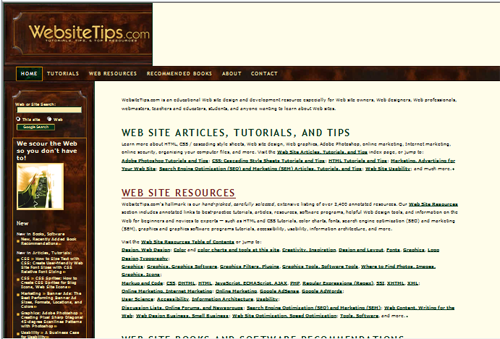
Let’s give an example of how drastically different a website can look just in two different browsers; I will use Internet Explorer and Firefox for my example.  The website I will be using is: www.websitetips.com.  The part that makes me laugh about this is the first time I found the website is when I was doing homework for a web design class I took at BCIT and was researching different positioning techniques with CSS (Cascading Style Sheets) – the main way designers currently layout website content right now.  Here are two screen shots for you:

Internet Explorer:

Internet Explorer Screen Shot 

Firefox:

Firefox Screen Shot 

This website was obviously designed for Firefox (generally a designer’s choice browser) and not tested in Internet Explorer.  Let me point out the main things that I notice: 

  • In Internet Explorer in the heading area of the website the background image does not continue across the screen
  • There are 3 columns of content in Firefox, but only 2 in Internet Explorer – the 3rd column of content is added to the first (left) column in Internet Explorer
  • In Firefox there’s a small section of links on the top right section of the site that does not even exist in Internet Explorer
  • You do not see it in my screen shots, but on the very bottom of the page in the footer section of the site the content overlaps the background image badly in Internet Explorer

 This is just one example of MANY that exist on the internet.  Another aspect of this that I did not touch on above is also taking into consideration that people do not always upgrade their browsers – some people could easily be 3, 4 or even more versions back.  This may be them not wanting to change but it also may be for a company that cannot upgrade due to needing support for special software, for example.  So not only do you need to test cross-browser but in previous browsers too.  A great tool I have found for this is Adobe’s Browser Lab.  You can test multiple browsers and multiple versions. 

Browser Compatibility is one of many testing tasks that a good designer should do for you – and one thing that we at ARK Squared Productions always do for our clients!

The Importance of Lighting

Controlling the lighting of your environment can have a huge impact on the mood that you choose to set.  When planning an event you should consider adding dramatic lighting when you want to help direct the mood of the audience.  For example if you are doing a new product launch you may want to help build excitement by dimming the room lights and having dramatic stage lighting.  If you are inviting media to your event lighting is a must.  To portray a professional clean look you will want to have additional lighting over the standard lighting in the room.  Television cameras, particularly high definition cameras require bright lights to produce a crisp and clean image.  If you are having a gala dinner you will want to have control over the lights in the room.  Think of when you go to a restaurant for a nice evening, if the lights are too bright, you feel vulnerable, exposed, even like you are on display for others to see.  If the lights are to dark you feel like you are in a cave, and that you have to struggle to see what you are eating.  When the lighting is just right, you can relax and enjoy yourself. Keep these basic principles in mind when deciding the lighting in your event.  You can make the largest space feel intimate with the appropriate lighting.

You want to be sure that you use professional equipment to light your venue, the difference is extremely noticeable.  The standard residential lights range between 60 and 120 watts.  Professional lights typically start at 575 watts and move all the way up to over 1500 watts!  Not only do you get a brighter cleaner light, specialised light fixtures can provide a number of different feels for your light.  Sometimes you want an intense spotlight, other times a wide wash light is most appropriate.  Hiring a professional to help design, and set up your lighting is crucial. While you may be able to get the basic feel you want, an experienced technician can dial in the lighting to make it go from good to spectacular.

Lighting is evolving at a rapid pace at the moment; the advent of LED lighting allows you to not only control the brightness of the room but also the colour.  The colour options are endless with LED lights, but you need to make sure that they are used appropriately.  The last thing that you want to create is the feeling that a rainbow was sick in your venue!  Intelligent lighting is becoming more popular and more affordable as the technology improves.  These light have amazing abilities, but need to be used appropriately.  Intelligent lighting is also known as Moving Lights.  Many of these lights can perform multiple functions, acting both as a spot-light and a wash-light, change to any colour, and point any where in the room.  While these have been used for years in the theatre and music industry they are increasing in popularity for corporate functions.  Appropriate use of intelligent lighting can really make your event pop, and be a very memorable presentation.

Happy New Year’s!

Happy New Years to all!  We at ARK Squared Productions have been very busy these first few weeks of 2011 and we wanted to let you know of the upcoming Blog topics for the next few weeks.  We would also love to have some reader contribution on our topics, and hopefully we can answer any questions that you may have!

We are going to start the year off with a series of articles on the importance of technology and presentation tools for your events.  We will be focusing on the Importance of Lighting, discussing when it is appropriate to get a professional to come and help with the lighting of an event, and the different moods and emotions that lighting can make.  The next topic will be the Importance of Audio, why you should always consider what your listening audience hears, what is too much, and what is drastically too little.  Following that with will discuss Video and Visuals, pointers on how to have a unified look for your event, and how little, often cost effective things can make a huge difference!  The last topic in this series will look at the need to balance all three of these areas in order to have a great presentation, understanding why some areas are more important than others and the overall benefits that each of these areas can bring to an event.

I would love to have some people share their disaster stories, and their triumphs with events!

Thanks for continuing to read our Blog!  Keep ARK Squared Productions in mind for your Graphics, Web Design, Event Support and more!  We look forward to working with you in the future!

Networking Do’s and Don’ts

Following up on our previous post about the Importance of Networking, let’s look at a few things to do and to definitely NOT do when networking.

Do:

  1. Look your best.  Put on your professional clothes and a genuine smile.  If you want to be taken seriously you need to look like you take yourself seriously!  Showing up to a meeting, group or one on one, in cargo pants, baseball cap and a well used jacket does not leave a good impression.  Even if your job is not one where you need to wear “professional” clothes keep an outfit with you so you can change if you need to.
  2. Know your stuff.  Have an “elevator speech” ready in your mind at all times, and know yourself and your company enough that you can change it up to suit your listener.  Being able to confidently explain who you and your company are in 30-60 seconds can come in very handy, and the more you know it and less “umms” and “ahhs”, the more professional you will be.
  3. Bring Business Cards.  I’ve said it a million times, ALWAYS bring business cards with you, wherever you go.  You never know when you might run into a great contact – it’s not always at specific functions!  You may meet a great contact waiting in line at the supermarket and wouldn’t that be frustrating if you didn’t have a card to give them?  So whether it be an official networking event or just running out to get eggs and milk, bring cards with you!
  4. Shake Hands.  A great way to show confidence is with a great handshake.  A limp handshake can make anyone cringe – be sure yours is firm and confident!  Try to mirror the strength of the handshake you are receiving.  A handshake shows that you are paying attention to someone and are happy to meet them.  It’s hard not to talk to someone who is smiling and shaking your hand!
  5. Keep in contact with your connections.  The best connections are face-to-face or by phone, but keeping top-of-mind with a great email newsletter with useful information (not just sell, sell, sell!) can work wonders as well.  If you’re a realtor, for example, you may meet someone who is not intending to sell, but in a few months if they are and need a realtor pulling your contact information from a recent email is easy!

Don’t:

  1. Be late.  Ensure that you arrive on time or a couple minutes early.  Not only will it keep you from being harried, stressed out and out of breath, but it makes a good impression.  It shows that you care enough about your appointment or event to come on time.  It also shows respect for others that did show up on time by not wasting their time!
  2. Talk more than you listen.  Everyone hates someone who rambles on and on about nothing, and finds it even more annoying when someone goes on and on about how amazing they are.  Listening to someone makes them feel important, and who doesn’t want to feel important?  Always remember, you have two ears and one mouth – use them in the same ratio!
  3. Ignore referrals.  If you mention that you’re looking for a particular contact, and get the contact, follow up!  If someone is referring to you they are putting their reputation out for you as well.  It can look bad for the person referring to you if you do not follow up.  And always thank people for referrals, even if they don’t work out.  A gift or cards is great, but even a genuine email or phone call can work too.  Everyone loves to know their referral was appreciated!
  4. Sell, Sell, Sell.  A genuine conversation is always more comfortable than listening to someone pushing their products or services on you.  Networking is about relationships not getting a big list of clients.  A good relationship can lead to a more long-term customer anyhow.  So hold off on your sales pitch and shoving your business card in someone’s hand the second you meet them, introduce yourself, learn about them and then exchange cards or give more details about your product or service.
  5. Cling to people you know.  Networking is all about meeting new people.  How can you meet new people if you cling only to those you know?  Always look for new faces and don’t be afraid to introduce yourself.  Particularly at Networking Events – everyone is there to meet people anyway!  If you know yourself and your company well networking doesn’t have to be difficult.

Keep these tips in mind and your Networking should start being a lot smoother.  And always remember – Networking happens EVERYWHERE, ALL THE TIME.  So keep your business card handy and smile!